






I approached MAJORITY as a practical finance app rather than a replacement for every banking service. Its main appeal is straightforward: it brings a US account and debit card into one mobile experience, with tools aimed at people who need to manage everyday spending, send money home, and work on their financial footing without starting with a Social Security number. In my use, the value comes less from flashy extras and more from having a repeatable routine for receiving, spending, transferring, and checking money.
It is a free app from MAJORITY USA, LLC, available for Everyone, and it has built a substantial audience with over a million installs. The current version is 5.14.0, while the app first appeared on April 26, 2019. Those details matter because this is not a brand-new experiment; it is an established mobile banking option that has had time to develop around a specific audience.
How the everyday MAJORITY workflow feels
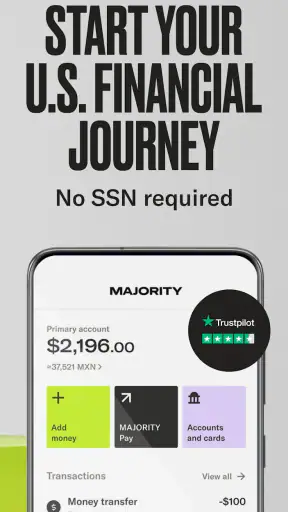
The simplest way to use the app is to treat it as a central place for routine money movement. I would begin by completing the account setup, reviewing the available account and debit card details, and then deciding what the app’s job will be in my financial life. For one person, that may mean receiving money and paying for groceries. For another, it may be a way to send funds to family while keeping a separate spending balance.
That distinction is important. MAJORITY is most convincing when I use it with a clear purpose instead of expecting it to behave like a complete replacement for every traditional bank relationship. The account and card give the app a familiar foundation, but the experience is designed around access and convenience. The “no SSN” positioning can be particularly relevant for people who have found ordinary account-opening processes difficult, although I would still read each verification step carefully and keep any requested personal information accurate.
Once the account is ready, I would establish a basic sequence: check the balance before spending, use the debit card for planned purchases, review activity after transfers, and keep money intended for a specific purpose separate in my own mental budget. This sounds ordinary, but it prevents a common mistake with mobile finance apps: treating an available balance as money that is automatically free to spend.
A realistic example would be someone paid on a regular schedule who wants to send part of their income to relatives abroad. I would first decide the amount before opening the transfer screen, confirm the recipient details slowly, and then return to the transaction history afterward. That last step is easy to skip when a transfer feels routine, but it creates a useful record and gives me a chance to catch a wrong recipient or unexpected detail early.
The same habit helps with the debit card. Rather than using it casually for every small purchase, I would make it part of a weekly spending plan. I might reserve one portion for food, another for transport, and leave the rest untouched for bills or family support. The app does not need to make that decision for me; its role is to make the account and card accessible enough that I can follow the plan consistently.
Who gets the most from the account and card
I see the strongest fit for people who want a mobile-first way to handle daily money and international family responsibilities in the same general experience. It can also suit someone who values a simpler entry point than a conventional branch-based process, especially if the absence of an SSN requirement is relevant to their situation. The free price removes an obvious barrier to trying it, though free access should never be confused with every possible transaction being cost-free in every circumstance.
The app also makes sense for users who prefer checking their finances from a phone instead of visiting a branch. A phone-based workflow can be useful for someone who moves frequently, works irregular hours, or needs to monitor spending while away from home. I would still keep a separate emergency method of accessing important account information, because relying on one phone app for every financial need can become inconvenient if the device, connection, or login process is unavailable.
People looking for a broad wealth-management platform, detailed investing tools, or a highly specialized budgeting system may be better served elsewhere. MAJORITY’s identity is clearer when viewed as mobile banking with a remittance-oriented purpose, not as an all-in-one financial command center. That focus is a strength for the right user and a limitation for someone who wants advanced financial planning in the same app.
Settings I would check before building a routine
After setup, I would spend a few minutes examining every account, card, notification, and transfer-related option visible in the app. The exact choices can change as software evolves, so I would not assume that the default configuration matches my needs. The practical goal is to make important activity visible without turning every minor event into noise.
Notifications deserve special attention. I would want alerts that help me notice card activity, transfers, or account changes promptly, while avoiding a setup so crowded that I start ignoring everything. A useful approach is to keep security- and money-movement alerts prominent, then decide whether routine purchase notifications help me stay within budget. For a shared household, immediate awareness can be more valuable than convenience; for someone making many small purchases, a daily review may be easier to manage.
I would also review the debit card controls and contact information before using the card regularly. If the app offers a way to manage card availability or related protections in the current interface, I would learn where those controls live before an urgent situation occurs. The best time to find a card-management option is during a calm setup session, not after noticing a suspicious transaction.
Another setting worth checking is the profile and verification information. Since the service is built around account access without an SSN, accuracy still matters. I would use my real details, make sure my phone number and email are current, and avoid creating a rushed setup that could make later account recovery harder. A finance app is not the place for disposable contact information if I expect to depend on it.
For transfers, I would carefully inspect the recipient information and any confirmation screen. I would not assume that a familiar name guarantees the correct destination. My habit would be to compare the recipient details against a trusted message or saved record, especially when sending money home. This is one of the most useful settings-and-workflow combinations: notifications tell me what happened, but deliberate confirmation helps prevent sending money to the wrong place in the first place.
Shortcuts that make repeat use less stressful
Experienced use of MAJORITY is mostly about reducing avoidable decisions. I would choose a regular time to check the balance and recent activity, then use that same moment to review pending plans. A quick check before leaving for work and a fuller review after payday can be more sustainable than opening the app constantly without a clear purpose.
I would also keep a written or offline note of recurring transfer intentions: recipient, approximate amount, and reason. This is not a substitute for checking the app, but it provides a second reference when several family payments look similar. It is especially useful when I send money on different days or need to distinguish support for household expenses from a personal transfer.
For card spending, I would use a “pause before purchase” rule for anything outside my normal routine. The app can show the account activity, but it cannot decide whether an unplanned purchase will interfere with a scheduled transfer. By checking the balance and my own plan first, I make the debit card work as part of a system rather than as an invitation to spend whatever happens to be available.
Another efficient pattern is to review transactions in batches. Instead of reacting emotionally to every small debit, I would scan activity once or twice at predictable times, identify anything unfamiliar, and record questions immediately. This makes ordinary spending easier to recognize and unusual activity easier to isolate. It also gives me a clearer picture of how much money is truly available for the rest of the week.
I would keep the app updated through the normal store process, particularly because the current version is 5.14.0. Updates can change navigation and available controls, so after an update I would quickly revisit the places I use most: balance, transactions, card information, and transfer actions. A thirty-second orientation check is preferable to tapping through a changed screen during an urgent payment.
Sending money home without turning it into guesswork
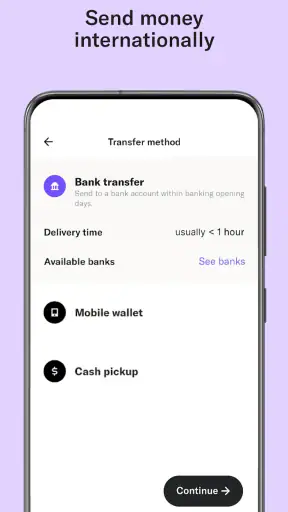
The international-money aspect is one of the reasons to choose MAJORITY over a basic domestic banking app. In my view, the important question is not simply whether a transfer can be started, but whether I can make the process repeatable and understandable. I would prepare recipient details in advance, confirm the destination each time, and save the confirmation or transaction record according to my own record-keeping needs.
I would also separate the emotional urgency of helping family from the mechanical act of sending money. When someone asks for funds quickly, it is tempting to rush through the screen. My safer workflow would be to verify the request through a trusted channel, compare the recipient information, and check that the amount will not interfere with essential expenses. The app can make the transfer convenient, but convenience should not remove the pause that protects against mistakes.
Users should pay attention to the final amount, delivery expectations, and any displayed transfer details before confirming. I would not rely on an informal estimate from an old message because exchange conditions and transaction terms can change. If the transfer is especially important, I would keep the confirmation information until the recipient confirms receipt.
This is also where MAJORITY differs from a general checking account. A traditional bank may be the better choice for someone whose main need is domestic bill payment, branch support, or a broad set of banking products. A dedicated remittance service may be preferable when comparing a particular destination, delivery method, or exchange arrangement. MAJORITY’s advantage is bringing account access, debit spending, and sending money home into one focused mobile relationship; its trade-off is that users should still compare the details of important transfers instead of assuming the app is automatically the cheapest or fastest route for every situation.
Building credit: useful goal, limited shortcut
The app’s positioning also includes building credit, which can be meaningful for someone trying to establish a stronger financial profile. I would approach that goal patiently. Opening or using a finance product does not replace the habits that support healthy credit behavior, such as paying attention to obligations, avoiding spending beyond repayment ability, and checking information carefully.
I would not treat the credit feature as permission to increase spending. Instead, I would connect it to a small, predictable part of my routine and monitor how it fits with the rest of my finances. If the app presents specific terms or actions related to credit, I would read them before opting in rather than assuming that “building credit” works identically to every other product.
This is another situation where a different option may be better. Someone who already has a well-managed credit card and wants detailed credit monitoring may need a separate service with tools designed specifically for that purpose. Someone starting from limited access may appreciate having the goal presented within a mobile banking environment, but should still judge the actual terms and personal affordability before committing.
Where the practical limits appear
The biggest limitation is scope. MAJORITY can be a useful financial home for a particular set of needs, but I would not assume it replaces every service I use. If I needed sophisticated budgeting categories, investment management, extensive lending options, or a branch network, I would compare alternatives before moving all my finances into it.
There is also a human-support trade-off with any mobile-first experience. A phone interface is convenient when everything works as expected, but a problem involving identity checks, a card, or a transfer can feel more serious than a normal app issue. I would keep transaction records, use current contact details, and avoid waiting until the last minute for an important payment. Those habits do not eliminate friction, but they make a problem easier to explain and resolve.
Connectivity and device access are practical considerations too. I would not schedule a critical transfer at the exact moment I need the money, and I would keep my phone secured with the normal device protections. If I change phone numbers or lose access to my device, account recovery can become more complicated when the app is the primary route to my money, so maintaining accurate profile information is essential.
The debit card can simplify spending, but it can also blur the boundary between money meant for daily purchases and money intended for family support. I would solve that through a personal rule: before using the card, identify which upcoming obligation the balance is protecting. That small pause is more valuable than any shortcut because it addresses the central risk of convenient access—spending without remembering the next commitment.
How it compares with ordinary banking alternatives
Compared with a conventional bank, MAJORITY feels more direct and mobile-centered. The account, debit card, money-sending purpose, and credit-building angle are presented for people who want a focused digital experience. A traditional bank may offer a wider ecosystem, but it can also feel less tailored to someone whose priorities include sending money home and getting started without an SSN.
Compared with a standalone remittance app, MAJORITY has the benefit of combining money movement with an account and debit card. That can reduce the number of apps I need for everyday finances. The trade-off is that a specialist transfer service may provide a more detailed comparison for one particular corridor or transfer method, so I would look at the actual terms each time the amount is significant.
Compared with prepaid spending products, the account structure and broader financial aims may make MAJORITY feel more useful for an ongoing routine. Still, I would read the current account and card terms rather than choosing based only on the word “free.” Cost, access, transfer conditions, and support experience matter more than the headline price when the app becomes part of a household’s regular money flow.
My verdict after using it with discipline
MAJORITY works best when I use it intentionally: set up accurate account details, tune notifications, confirm recipients, review activity, and keep debit spending tied to a simple budget. Its strongest qualities are the mobile-first account and card experience, the focus on sending money home, and the possibility of starting without an SSN. The free price and Everyone age rating also make it approachable for a broad audience.
Its weaknesses are mostly about expectations. I would not choose it blindly as a universal replacement for a full-service bank, a specialist remittance comparison tool, or a dedicated credit-monitoring platform. I would also avoid rushing important transfers or assuming that a convenient screen removes the need to check terms, recipients, and balances.
The app’s 4.7 average from around twenty-three thousand ratings suggests that many users find the experience worthwhile, and roughly twelve thousand written reviews show that people are actively discussing it. I treat that reception as encouraging rather than decisive: my own choice would depend on whether the account, debit card, transfer needs, and credit goals match my situation.
My recommendation is simple: choose MAJORITY if you want one focused mobile finance app for everyday account access and sending money home, and if you are willing to build careful checking habits around it. Skip it in favor of a broader bank or a specialized service when your priorities are advanced financial tools, extensive domestic banking features, or highly detailed transfer comparisons. Used within its intended lane, it can be a practical companion rather than just another finance app on the phone.


